Will you make it 3 months ahead?
Cash-flow Planner
Type your money in and your money out, once. The file projects your balance day by day for 6 months and shows what you can safely spend today, the lowest point and its date, and what happens if your estimates slip.
- Every money in and out on its day, up to 100 and 200 lines
- Sure or estimate: the what-if moves estimates only
- Runway: how long today's balance alone lasts
- Excel 2016+ and Google Sheets, on a computer
$6.99
One-time purchase
Instant download
Instant download
In the download: the Excel file (.xlsx) and the Quick Start PDF, with your Google Sheets copy link and the video tutorial.
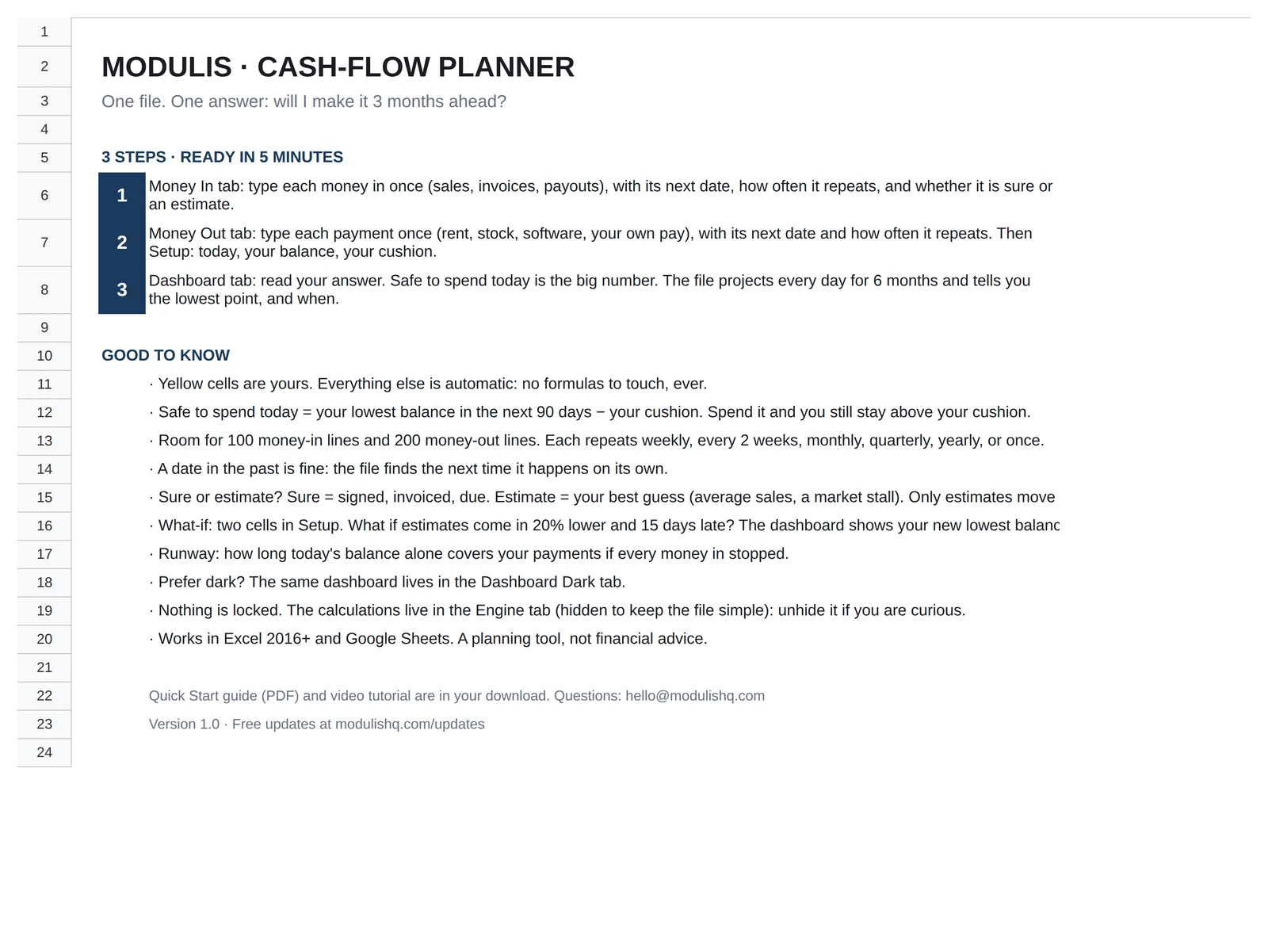
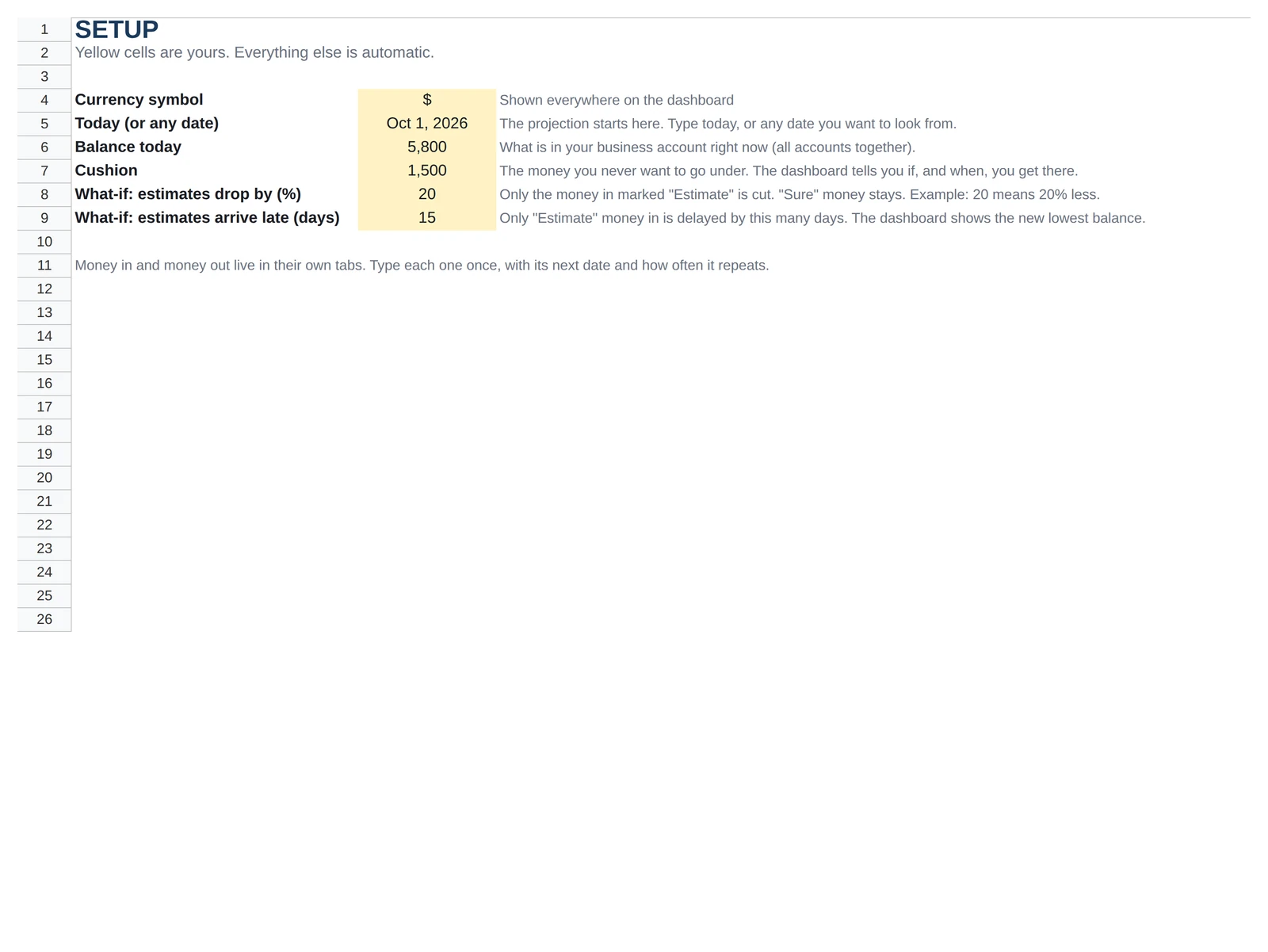
Every image is the real file, with its sample dataClick a tab, click to zoom
The dashboard
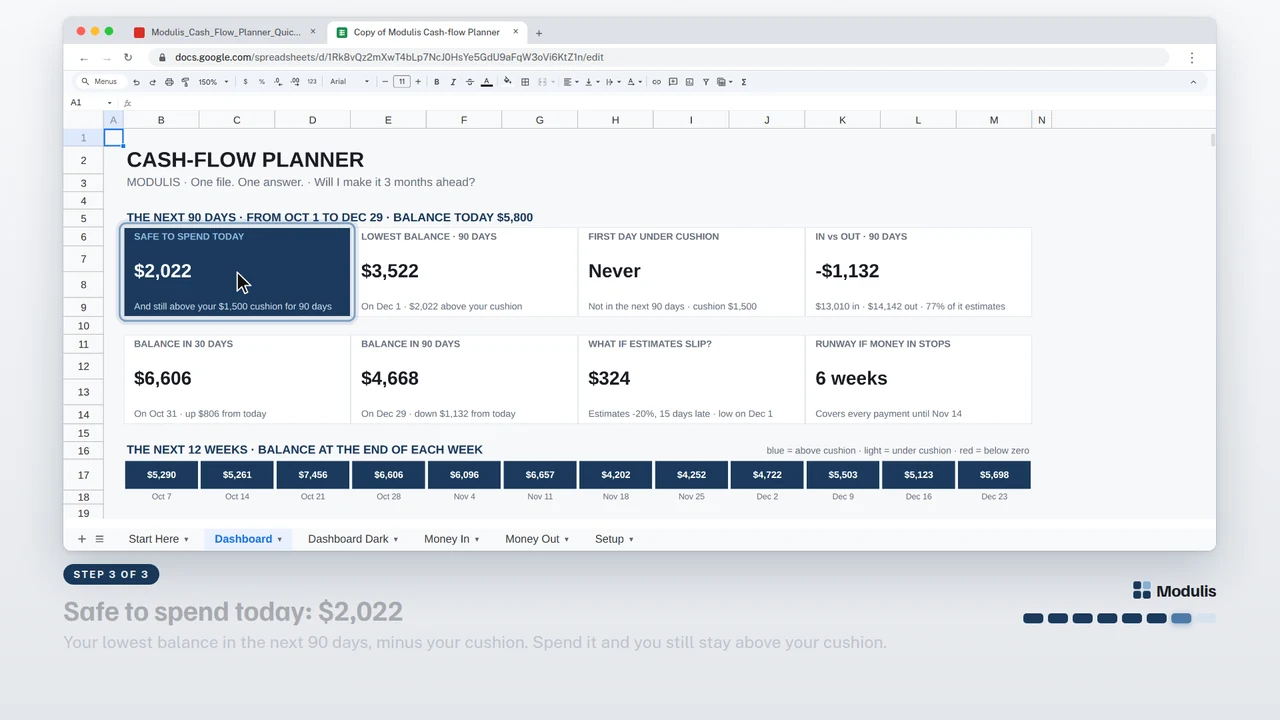
The answer, on the first screen.
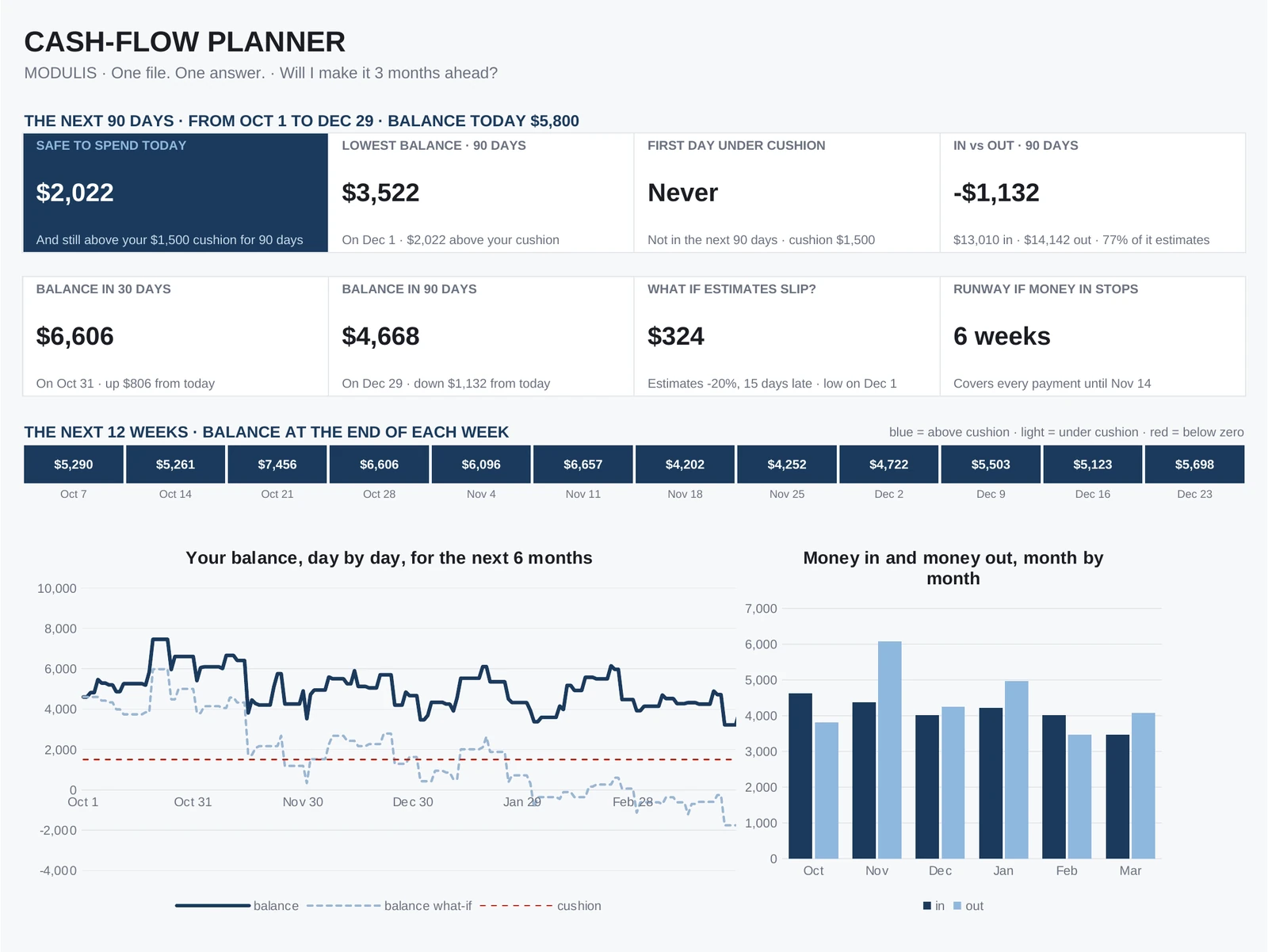
Everything on this page is calculated from the tabs you fill in. Here is what each part tells you, shown with the sample data.
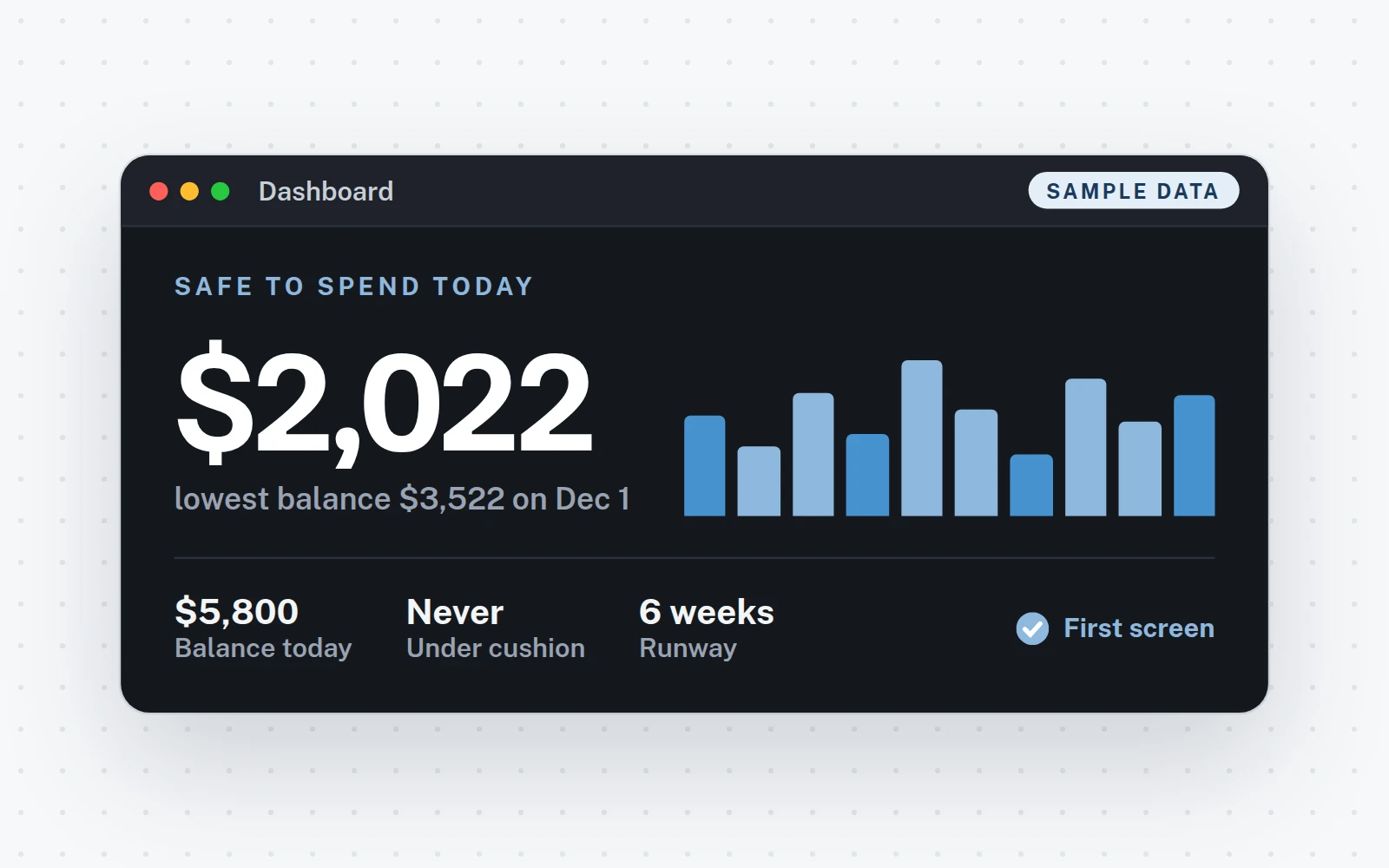
- 1Safe to spend todayYour answer: your lowest balance in the next 90 days, minus your cushion.
- 2Lowest balance, first day under cushionThe day your balance is lowest, whether you dip under your cushion, and money in vs out over 90 days.
- 3Balance in 30 and 90 daysWhere you stand a month and three months from today.
- 4What-if and runwayYour lowest balance if estimates slip, and how long today's balance alone covers your payments.
- 5The next 12 weeksBalance at the end of each week: blue = above cushion, light = under, red = below zero.
- 6Every day for 6 monthsYour balance day by day, with the what-if line and your cushion.
- 7Month by monthMoney in and money out. Below: your biggest payments, the money in you count on, and the what-if.
How it works
Three steps, about 5 minutes.
12 minutes
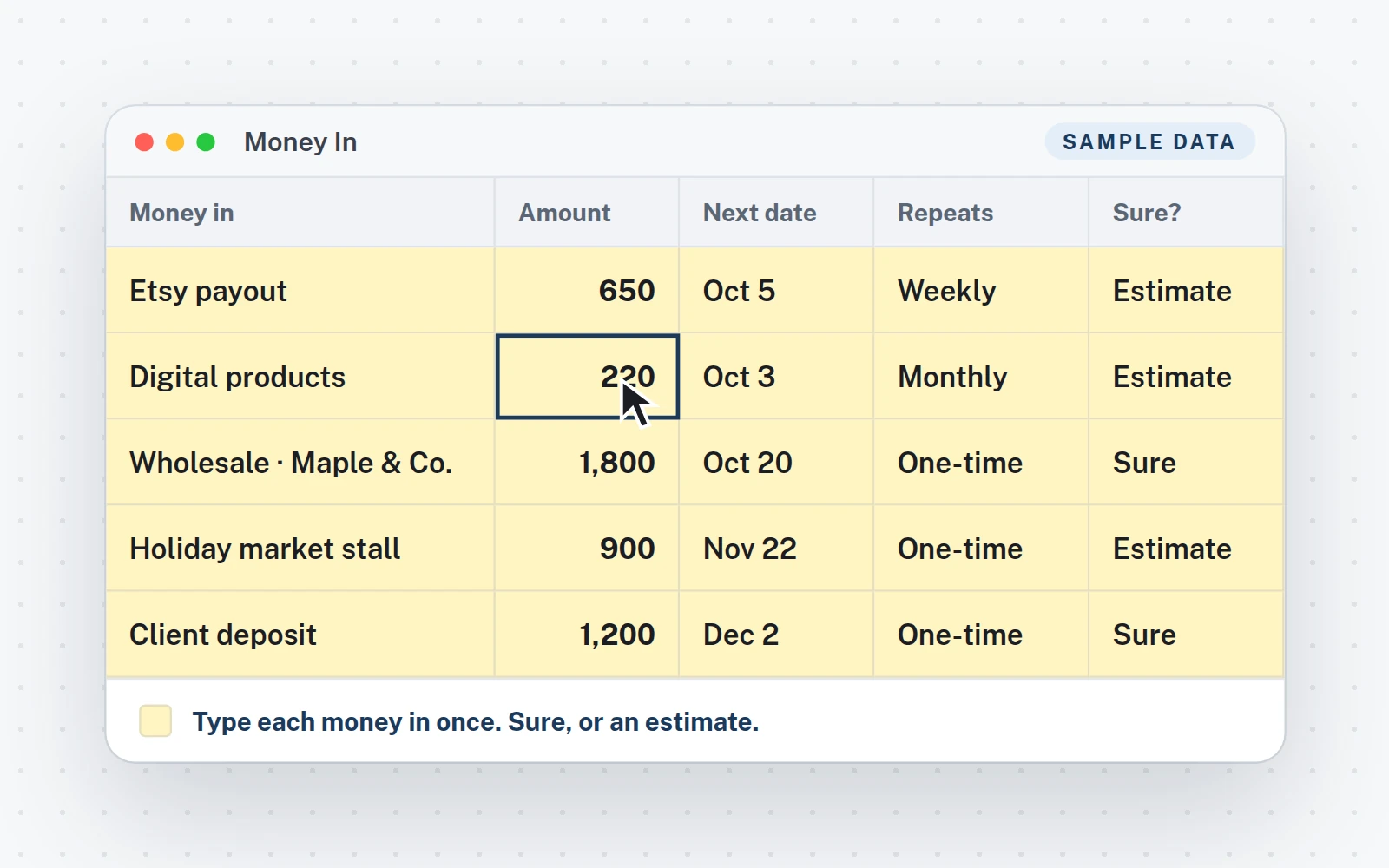
Type your money in
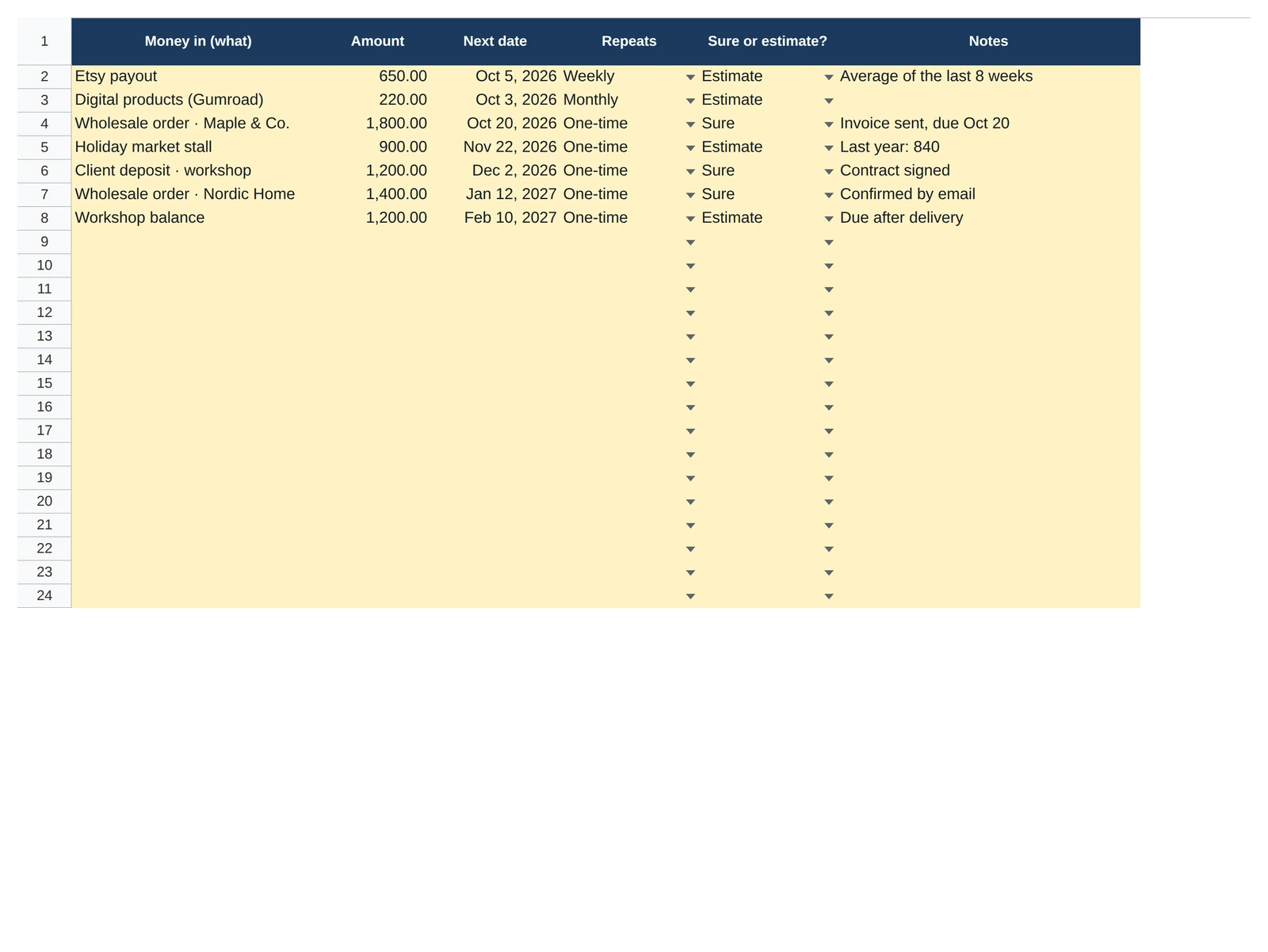
Money In tab: name, amount, next date, how often it repeats, sure or estimate. Replace the 7 sample lines, up to 100.
23 minutes
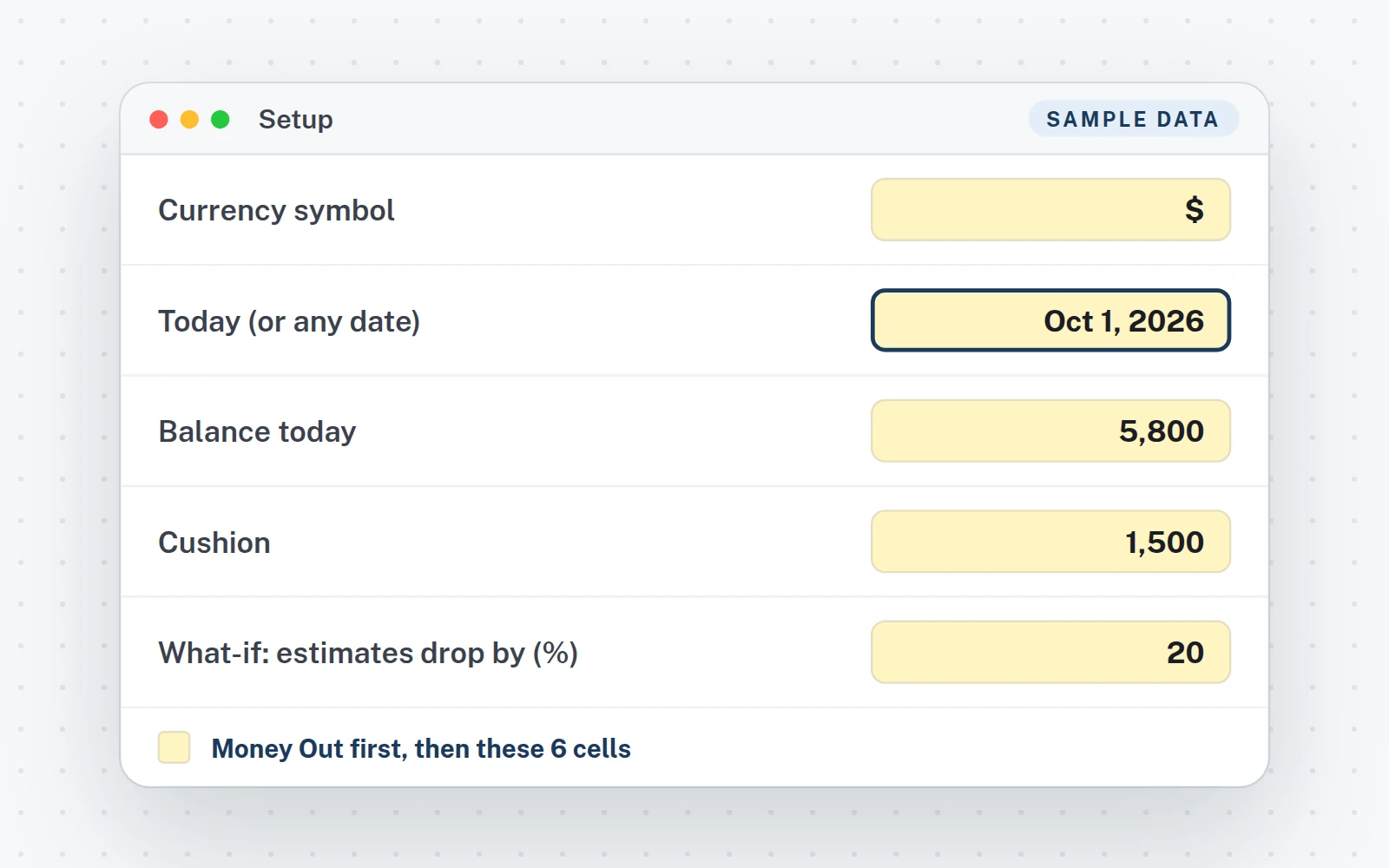
Money out, then Setup
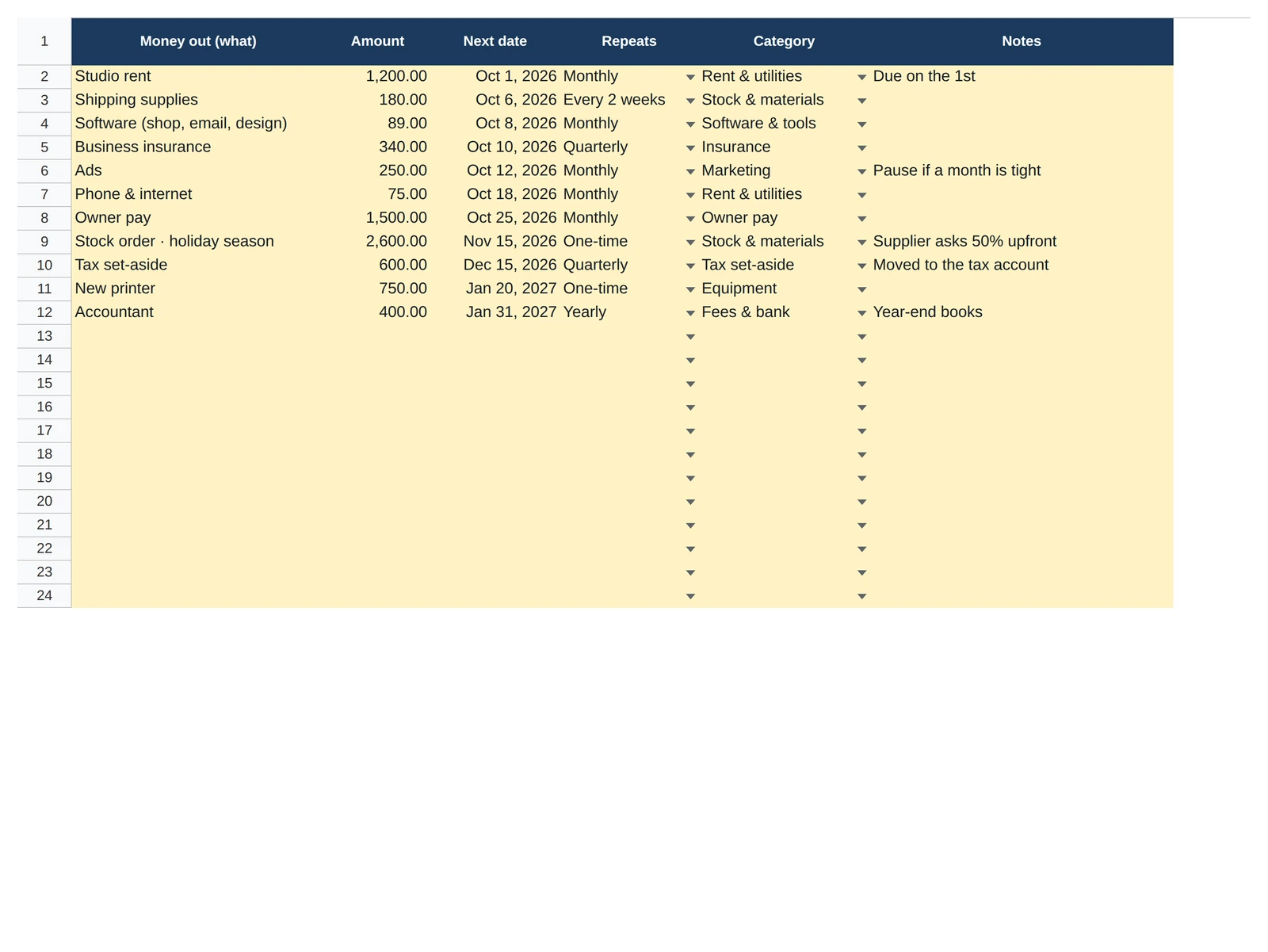
Money Out tab: every payment once, up to 200. Then Setup: today, your balance, your cushion and the two what-if cells.
3Instant
Read your answer
Dashboard tab: what you can safely spend today is the first thing on the page.
What you get
Everything in the download.
The files
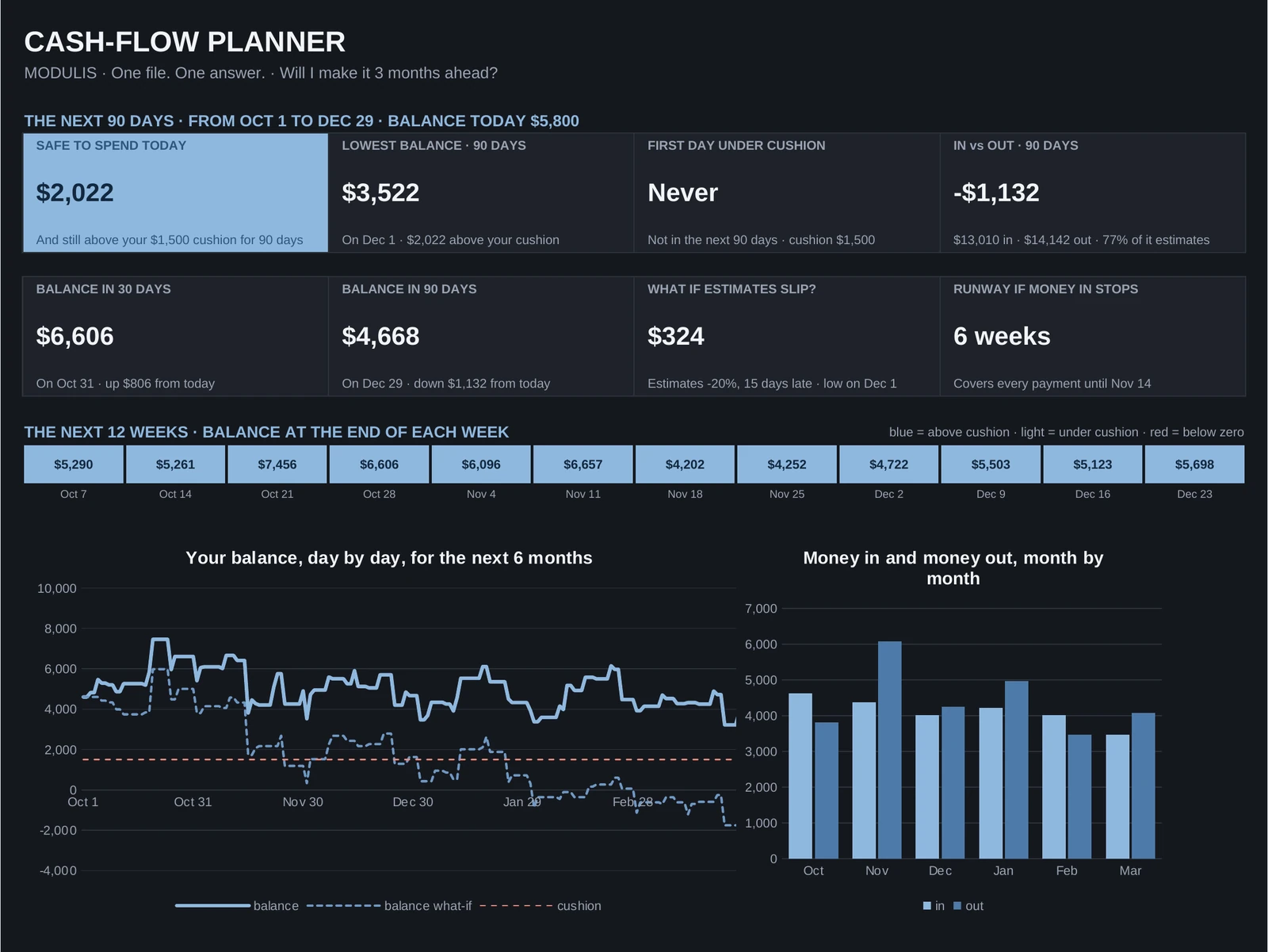
- XLSXThe Excel fileTabs: Start Here · Dashboard · Dashboard Dark · Money In · Money Out · Setup.
- Your Google Sheets copyClick the link in your PDF, then Make a copy: it is yours, in your Drive.
- Quick Start guideA 5-page PDF: your links, then the setup step by step.
- Video tutorial (1:35)From the download to your answer.
- Free updatesNew versions at no cost, where you bought the file.
Works in
- Excel 2016 or newerWindows and Mac. Made for a computer screen.
- Google SheetsIn your browser, with a free Google account.
- Real formulas, nothing lockedThe calculations sit in one hidden tab you can unhide.
- $€£Any currency, any regional settingType your symbol once. Labels are in English; the formulas work in any Excel or Google Sheets language. No macros, no add-ins.
Try it
Move the cushion. Move the what-if. Read the answer.
This is the Cash-flow Planner template's own math, running on its sample file (Oct 1 to Dec 29: $5,800 today, $13,010 in, $14,142 out). Your file does the same with yours.
Lowest balance in 90 days, as planned$3,522on Dec 1, after every money in and out
Lowest balance if estimates slip$324under your cushion from Nov 25
Safe to spend today = your lowest balance in the next 90 days, minus your cushion. The what-if applies to the money in marked Estimate only (77% of the sample's next 90 days); sure money stays on its date. In the file, every line lands on its day by itself, for 6 months.
Safe to spend today
$2,022
Never underyour cushion in the next 90 days
Cushion kept aside$1,500
If the money in marked Estimate drops 20% and arrives 15 days late, your lowest balance in 90 days goes from $3,522 to $324 and you go under your cushion on Nov 25.The same sentence, on the file's dashboard
 1:35
1:35
Video tutorial · 1:35
Watch the whole setup.
- 0:00Your download: the planner, the Quick Start PDF and your Google Sheets copy
- 0:16Start here, then step 1: Money In, type each money in once, sure or estimate
- 0:41Step 2: Money Out, every payment once, then Setup: balance, cushion and what-if
- 1:02Step 3: read your answer on the dashboard, what-if, runway, and dark mode
FAQ
Questions about this file.
What is "safe to spend today"?
Your lowest balance in the next 90 days, minus your cushion. The file projects every day from today: every money in and every payment on its date. Spend that amount now and you still stay above your cushion for 90 days.
Sure or estimate: what is the difference?
Sure = signed, invoiced, due: a contract, an invoice sent. Estimate = your best guess: average weekly sales, a market stall. Both count in the projection; only estimates move in the what-if, so you know how much of your next 90 days rests on a guess.
How do repeating payments work?
Type each one once with its next date and how often it repeats: once, weekly, every 2 weeks, monthly, quarterly or yearly. A date in the past works too: the file finds the next occurrence on its own. Up to 100 money-in lines and 200 money-out lines.
What does the what-if do?
Two yellow cells in Setup: a drop (say 20%) and a delay (say 15 days). The dashboard shows your new lowest balance in 90 days if your estimates come in lower and later, and the day you would go under your cushion. Sure money stays where it is.
What is the runway?
How long today's balance alone covers your payments if every money in stopped: in weeks, with the last day covered. A number to know, not a forecast.
Money arrived. What do I update?
Update Balance today in Setup, or move the line's date. The projection always starts from the date in Setup: type today and everything ahead recalculates.
Is it made for phones?
No. It is built for a computer screen: Excel 2016 or newer on Windows or Mac, or Google Sheets in a browser.
Is this financial advice?
No. It does the math on the numbers you enter. The decisions stay yours.
Cash-flow Planner · $6.99
One-time purchase · instant download · Excel and Google Sheets · free updates
Also from Modulis
Another question, another file.